Feeds:
Posts
Comments

Archive for the ‘09 Map Symbolization’ Category

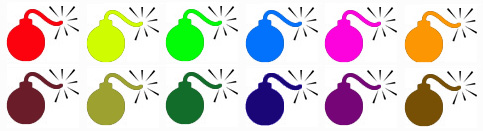
bomb-multiple.jpg

Google’s My Maps allows the easy creation of pseudo map mash-ups, where you can map your own data as points, lines, and area symbols with Google Maps as the background.

I wrote about My Maps – basic how-to and some of its limits – in another blog post, Allelopathic Maps & Google’s “My Maps.” One of the My Maps limits, the inadequate and corny set of available map symbols, has been removed: you can now create and use your own map symbols in My Maps.

To work with My Maps you need a Google account, and to use custom symbols (icons, as Google calls them) you need some server space to upload your symbols: you must provide a URL to the symbols. You should be able to find a free web hosting service that allows hot-linking (the placement of an image hosted on the free site in a My Maps map in this case). You can also embed images in the pop-up balloon associated with points, lines, and areas on My Maps, and you need server space to host those files.

In Custom Icons for Your Maps, a posting on the official Google Earth/Maps blog, PNG files with transparent backgrounds are recommended, although JPG and GIF should also work. PNGs and GIFs can have transparent backgrounds, essential if you don’t want a white box surrounding your symbol. As Google says PNG, lets PNG.

(more…)

Read Full Post »

typewriter-map-symbols.jpg

Map-making has often adapted technologies designed for purposes other than making maps.

I recall Scitex hardware as the state-of-the-art in large format color computer mapping in the early 1980s when I was first learning cartography. Cartography applications were developed when Scitex, its origins in designing and printing textiles, noticed “the similarity between printing large fabric surfaces and coloring topographic surfaces.” (PDF source).

Step back a few generations and we find the then ubiquitous typewriter adapted to making maps by DIY cartographers.

(more…)

Read Full Post »

thresholds.jpg

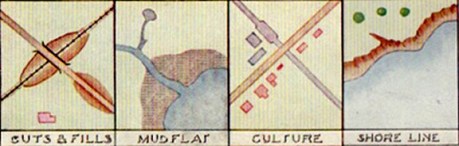
Cartographers have long been concerned with how map-readers perceive map symbols. How small can a map symbol be and still be noticed? What size do symbols have to be for a viewer to differentiate and clearly distinguish different shapes or forms? Such questions can be answered by using psychological methods of evaluation, as discussed in my previous post on the Perceptual Scaling of Map Symbols, or based on the experience of skilled map makers.

Examples of some thresholds of map symbol perception are illustrated by Prof. E. Spiess in a chapter entitled “Map Compilation” in the out-of-print book Basic Cartography, Vol. 2 (International Cartographic Association, 1984). At the time Spiess was the Director of the Department of Cartography at the Swiss Federal Institute of Technology.

Note: the illustrations below are guidelines for printed maps. Typically, increase sizes for computer displays. The illustrations have been slightly expanded in size from the originals to make them readable on a computer screen. Click on the image for a larger version. Illustrations are for educational purposes only.

(more…)

Read Full Post »

flannery-check.jpg

flannery-check-yes.jpg

What if there was a gap between mapped data and our perception of it?

Buried in the ArcGIS symbolization options for proportional symbol maps is a puzzling check box labeled Appearance Compensation (Flannery) that addresses one gap between perception and data symbolized on maps.

This check box is a vestige of academic cartography’s extensive engagement with psychophysics beginning in the 1950s. Psychophysics relates “matter to the mind, by describing the relationship between the world and the way it is perceived.” Psychophysical studies select specific sensory stimuli and evaluate human perception of the stimuli. Cartographers studied thresholds (what is the smallest type size the average viewer can read?), discrimination (what is the minimum difference between two gray tones required for the average viewer to perceive a difference?), and scaling (how to scale a map symbol so the average user correctly judges the symbol’s value?).

The most studied map symbol was the proportionally scaled circle.

(more…)

Read Full Post »

erosion-flood-symbols-sample.jpg

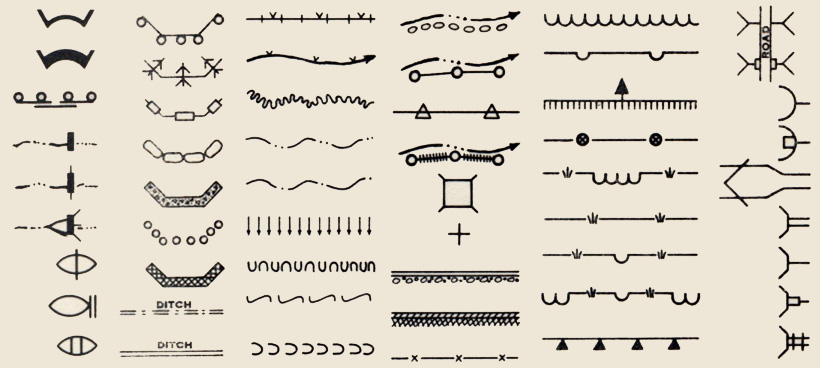
Dams, bulkheads, arches, ditches, flumes, outlet spreaders, outlet baffles, revetments, riprap, fence, gullies, borings, test pits, siphons, retaining walls, culverts, inlet transitions, jump structure, overfall, tree plantings, sheet erosion plantings, streams, lakes, terraces, ground water, water seepage, water limits, drains, percolators … the language of erosion and flood control in 1930s America.

The above symbols are selected from five pages (full PDF below) in Symbols and Instructions for Maps and Plans, a book compiled and published by the U.S. Department of the Interior Office of Indian Affairs in 1941.

(more…)

Read Full Post »

voyager_snip.jpg

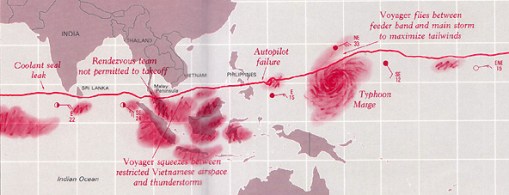
Edward Tufte’s The Visual Display of Quantitative Information (1998, 2nd edition 2001) is a classic book, arguably his best, and certainly a key text in the field of information graphics (which encompasses cartography). I know some cartography courses use the book as a text.

I recall being inspired by the book as a neophyte cartographer back in the late 1990s.

The book looked great: its design communicated the importance of design (when most other cartography and information graphics books were clunky and poorly designed). The tone was serious and high-minded: I was designing information graphics. And I think I absorbed Tufte’s minimalist design philosophy, although cartographic design, at least the way I learned it, was largely minimalist, with no allowance for flourish, fake 3D embellishment, or other chartjunk (or “map-crap” as I call it in the Making Maps book).

While I won’t impugn the importance of lofty inspiration, I did wonder what kind of practical guidelines I could derive from Tufte’s book. You know, specific stuff that would help me to design and make better maps. I sat down one day and made a list of Tufteisms from the book: that list is below.

(more…)

Read Full Post »

nauticalchart-symbols.jpg

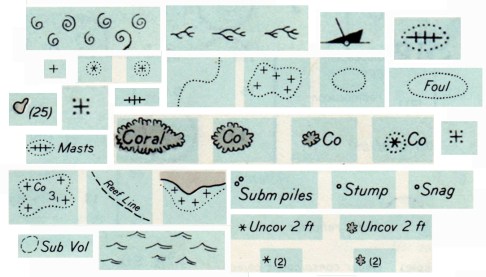
Rock which does not cover,
Coral reef, detached,
Wreck always partially submerged.

A number of sunken wrecks,
Obstruction of any kind,
Limiting danger line.

Foul ground, discolored water,
Position doubtful,
Existence doubtful.

Old map symbols and their descriptions can be poetic, enjoyable to view and read while providing ideas for symbols on contemporary maps. Indeed, is it possible that “maps are poems and poems are maps?” (see Howard Veregin’s “Geo-Poesy.”

Good map designers and map makers always look at other maps, including old maps, for map design ideas.

These symbols and textual descriptions of nautical dangers are taken from section O of Chart #1, Nautical chart symbols and abbreviations used by U.S. Lake Survey, Corps of Engineers, U.S. Army, Dept. of Defense; U.S. Coast and Geodetic Survey, Dept. of Commerce; U.S. Navy Hydrographic Office, Dept. of Defense (Washington DC, 1957). The entire page O from which the symbols were taken is here. A contemporary version of these symbols, still Chart #1, is here.

Read Full Post »

color-sloane-montz.jpg

Selecting effective colors for your maps is a challenge. In Making Maps I review basic color issues, including how we see and create colors, as well as the complexity of color interactions and some basic color guidelines.

A myriad of color resources for mapping exist. A few of the more useful are below.

ColorBrewer: Cindy Brewer and Mark Harrower’s ColorBrewer is a terrific and easy-to-use web-based tool for choosing appropriate color schemes. While the focus is on colors for choropleth maps, the color schemes are appropriate for other map types and information graphics. Color recommendations are displayed on a map (upon which roads, city symbols, and boundaries can be viewed). Icons indicate if the selected color scheme works well for the color blind, if photocopied, or on a computer projector, LCD, or CRT computer screen. Color schemes are specified in five different color models (CMYK, RGB, HEX, LAB, and AV3), making colors easy to transfer to mapping or graphic design software. Color recommendations are based on Brewer’s extensive color research. Requires Flash 5 or later.

Color Oracle: Up to 12% of the population is colorblind. A common form of colorblindness results in red and green looking the same. It’s a problem, then, if you create a map where red and green distinguish different phenomena. Bernhard Jenny and Nathaniel Vaughn Kelso’s Color Oracle is a free software application that simulates three types of color blindness on your computer screen. With your map on screen, start the software and toggle between different kinds of colorblindness to see if your colors work for people with that type of colorblindness. Simple and useful. Mac, Windows, and Linux versions.

(more…)

Read Full Post »

« Newer Posts